How To Set Up A Mac WWW Server
With Minimal $$$
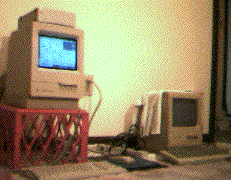 This page is meant to show you how to
turn your Mac into a World Wide Web server, while spending a minimal amount of money
(most likely you already have everything you will need). You can use anything from a
Mac Plus up to the newest Power Mac. For hardware, if you are expecting some heavy
traffic on your site, you will want a high speed connection and a faster Mac with alot
of RAM; if you're just Joe User looking to setup a small site to be accessed by a few
friends over the weekend, a modem along with that old Mac Plus in the closet will work
just fine. All of the software you need can be found on the internet or on any number of
online services - as shareware or freeware. The instructions that follow are geared more toward
Joe User who doesn't want to shell out any more green that absolutely necessary,
although for the most part setting up a larger Web server is essentially just as
simple (with a Mac, anyway).
This page is meant to show you how to
turn your Mac into a World Wide Web server, while spending a minimal amount of money
(most likely you already have everything you will need). You can use anything from a
Mac Plus up to the newest Power Mac. For hardware, if you are expecting some heavy
traffic on your site, you will want a high speed connection and a faster Mac with alot
of RAM; if you're just Joe User looking to setup a small site to be accessed by a few
friends over the weekend, a modem along with that old Mac Plus in the closet will work
just fine. All of the software you need can be found on the internet or on any number of
online services - as shareware or freeware. The instructions that follow are geared more toward
Joe User who doesn't want to shell out any more green that absolutely necessary,
although for the most part setting up a larger Web server is essentially just as
simple (with a Mac, anyway).
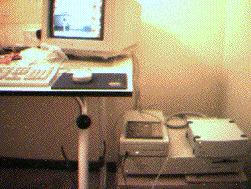
Poor Man's Equipment Checklist
- Macintosh
- 680x0 or PowerPC Macintosh - a Mac Plus or higher
- 4 MB RAM minimum requirement, though it can be done with 2MB (I know - I've done it)
- Hard Drive (at least 10 MB free)
You should be able to get a working 680x0 Mac w/ a hard disk for around $100
Maximum $$$ spent so far: $100
- Connection Hardware
- Modem
- Telephone - you DO have a phone, right?
You can get a quality 28.8 modem for $100 new (less for used). Keep in mind though, that
really old Macs like the Mac Plus can't handle serial speeds higher than 9600 baud.
Maximum $$$ spent so far: $200
- Internet Access
- PPP -OR-
- SLIP
- forget AOL or Compuserve, as you need a real TCP/IP connection to serve web pages.
A PPP account with unlimited internet access time can be had for $20 / month
Maximum $$$ Spent: $220
- System Software
- MacTCP (v2.0.6 recommended) -OR-
- Open Transport (v1.1 or higher recomended)
This software is included with every Mac sold today, and is also available free online.
Maximum $$$ Spent: $220
- Web Server Software
A couple of good shareware programs available online.
Maximum $$$ Spent: $300 - Pay those shareware fees!
- FTP Software
These can be downloaded online.
Maximum $$$ Spent: $300
- Web Browser Software
Again, these are available online.
Maximum $$$ Spent: $300
- E-Mail Software
Guess what! These are also available online.
Maximum $$$ Spent: $300
If you need any additional software, you can probably find it on InfoSeek's Webcrawler.
InfoSeek
Connecting to the Internet
 OK. You have a Mac. You have a telephone. You have a modem. Now you need to get
Internet access for this Mac. Perhaps you are a student and can get an internet
account through your school. If not, there are several service providers out there.
I recommend you get an account which allows you unlimited connection time for a set
fee (or free if you have an account through a school). Commercial internet service
providers (ISPs) will often even provide you with a few megabytes of space for
your own Web site on their system, which is very usefull for providing a consistent
gateway to the Mac Web server you will be setting up. You should be able to find an
ISP who will set you up with an internet account and web space from as little as
$20 a month, such as Netcom
or AT&T. Apple's
Internet Connection Kit provides you with all of the software you need to get an
internet account through any one of a number of ISPs, as well as web browser, e-mail,
FTP, telnet and newsgroup software, if you don't feel like downloading this software yourself.
OK. You have a Mac. You have a telephone. You have a modem. Now you need to get
Internet access for this Mac. Perhaps you are a student and can get an internet
account through your school. If not, there are several service providers out there.
I recommend you get an account which allows you unlimited connection time for a set
fee (or free if you have an account through a school). Commercial internet service
providers (ISPs) will often even provide you with a few megabytes of space for
your own Web site on their system, which is very usefull for providing a consistent
gateway to the Mac Web server you will be setting up. You should be able to find an
ISP who will set you up with an internet account and web space from as little as
$20 a month, such as Netcom
or AT&T. Apple's
Internet Connection Kit provides you with all of the software you need to get an
internet account through any one of a number of ISPs, as well as web browser, e-mail,
FTP, telnet and newsgroup software, if you don't feel like downloading this software yourself.
Configuring Your Mac
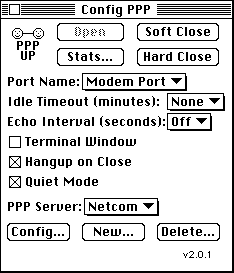 Once you have an ISP, you will need to configure your Mac to connect to your ISP
over the phone line via your modem. If you are using a PPP acount, the two most
popular software packages for connecting are MacPPP and FreePPP. Mac PPP is not
compatible with Open Transport, however FreePPP is. Which one you use is up to you.
Once you have an ISP, you will need to configure your Mac to connect to your ISP
over the phone line via your modem. If you are using a PPP acount, the two most
popular software packages for connecting are MacPPP and FreePPP. Mac PPP is not
compatible with Open Transport, however FreePPP is. Which one you use is up to you.
Set up your SLIP / PPP software by entering the appropriate phone number for
connecting to your ISP, as well as the desired connection speed (will depend on
what speed your modem runs at). This is generally all the information you will
need to dial into your ISP.
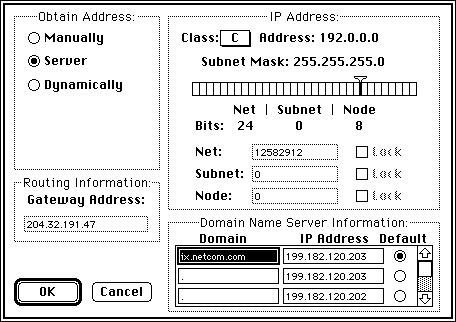
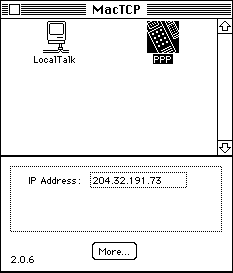 You will also need to do some minimal configuring of your TCP/IP software.
Users of MacTCP will do this via the MacTCP control panel, shown here. If you are
using Open Transport, you will use the TCP/IP control panel, which is similar to
the older MacTCP control panel.
You will also need to do some minimal configuring of your TCP/IP software.
Users of MacTCP will do this via the MacTCP control panel, shown here. If you are
using Open Transport, you will use the TCP/IP control panel, which is similar to
the older MacTCP control panel.
There are two pieces of information you need to provide:
- Access method for IP communication (this will be the PPP or SLIP server)
- Domain Name Server information - usually this information will fill itself in the
first time you connect with your ISP, or they will provide it for you.
You are now ready to connect to the internet through your ISP. Once you are connected,
you will be able to get your Mac's IP address via the MacTCP or TCP/IP control panel.
This is your Mac's internet address, which tells other computers where to look in order
to hook up to your computer over the internet. For the Mac shown here, the URL to access
it via the internet would be http://204.32.191.73/
Others will need this URL to connect to you, and it will be different everytime you connect
to your ISP. I will cover an easy method to make accessing your Mac at different
times easy in spite of this changing URL for your Mac.
Running The Server
Now that you are connected to the internet, you are ready to run your Web server.
Simply start up your Web server application, configured with whatever HTML scheme
you have set up, and you are in business! Your Mac is now running a fully functional
World Wide Web server.
Provide a Common Access Point (if at all possible!)
As mentioned before, it will be unlikely that anybody will know your Mac's IP
address each time you connect to your ISP, unless you somehow communicate that
information to others everytime you connect; otherwise, your Web server will see no traffic.
One way to do this is to maintain an off-site web page, and on that page keep a
link to your Mac's Web server (IP address) which you will update everytime you start
up your server (dial into your ISP). It is very common for ISPs to allow you to maintain a
web site on their system, which will have a constant URL. This would be the URL that you
would want to advertise to people that you want to connect to your Mac's server.
Each time you connect to your ISP, you would then modify your off-site web page(s)
with your newly obtained IP address, so that anyone who hits those links will be able
to conect to your most recent (and correct) IP address, thus accessing your Mac's web
server! This will ensure that others will have quick and easy access to your Mac's server
whenever it is up and running. When it is not running, they will find that out when they
are unable to connect to your site.
Another method is to get a domain name for your static IP address, using
a service such as Monolith's DYNDNS.
That is what I currently use for my Mac Web Server,
which has been hosted on a Mac Plus, Mac Classic, PowerBook 145, and currently a
PowerMac 6100 running MkLinux - whew!
Maintaining The Connection
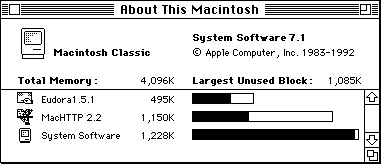
The tricky part is making sure that your internet connection stays up even during
long periods of inactivity. Most SLIP / PPP accounts will 'time-out' or disconnect
you if your connection is idle for an extended period of time. If your server is not
constantly getting visitors, or you are not constantly using your internet connection
for other activities, this will happen. Your ISP's system will figure "Hey, this person
isn't using their account for anything, so I will disconnect them so that some other
paying customers can access us!". Does this mean that you have to sit at your computer
and aimlessly surf the internet just to make sure your connection stays up?
No! There is a simple little trick you can use to automate your Mac
such that it will keep the connection up and running indefinitely (in most cases),
allowing you to leave your Mac Web server up and running, unattended, for as long as you like!
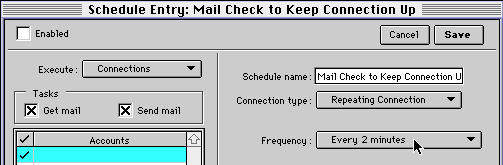
The trick is to keep an e-mail application running in the background, and set it up to
automatically check for new e-mail messages every few minutes - both Claris Em@iler and
Qualcom's Eudora allow this. This little step will be enough comminication between your
Mac and the ISP to keep your connection from being timed out! Your ISP's system will now
be thinking "Well, this person is still using their account, so I better leave them
connected for a while longer.". It works well enough that I have kept my Mac
server up and running on a PPP connection for days at a time.
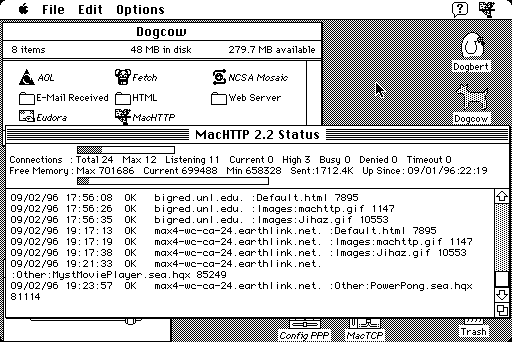
That, in a nutshell, is all you need to do to set up your Mac as a fully operational
World Wide Web Server! Use it to display information, graphics, host CGI applications,
Java, provide access to downloadable files on your Mac - it's up to you! You too can
have your own World Wide Web server for anywhere fom $0 - $300, as long as you do it
the Mac way :-)
Enjoy!
You can reach me by E-Mail
last modified on 10/11/97 by TrickyS - finally!
Home page created by TrickyS. Artwork by TrickyS.
Small Print: I cannot guarantee that the information provided here is accurate at the
time you read this. It was accurate to the best of my knowledge at the time I wrote it.